
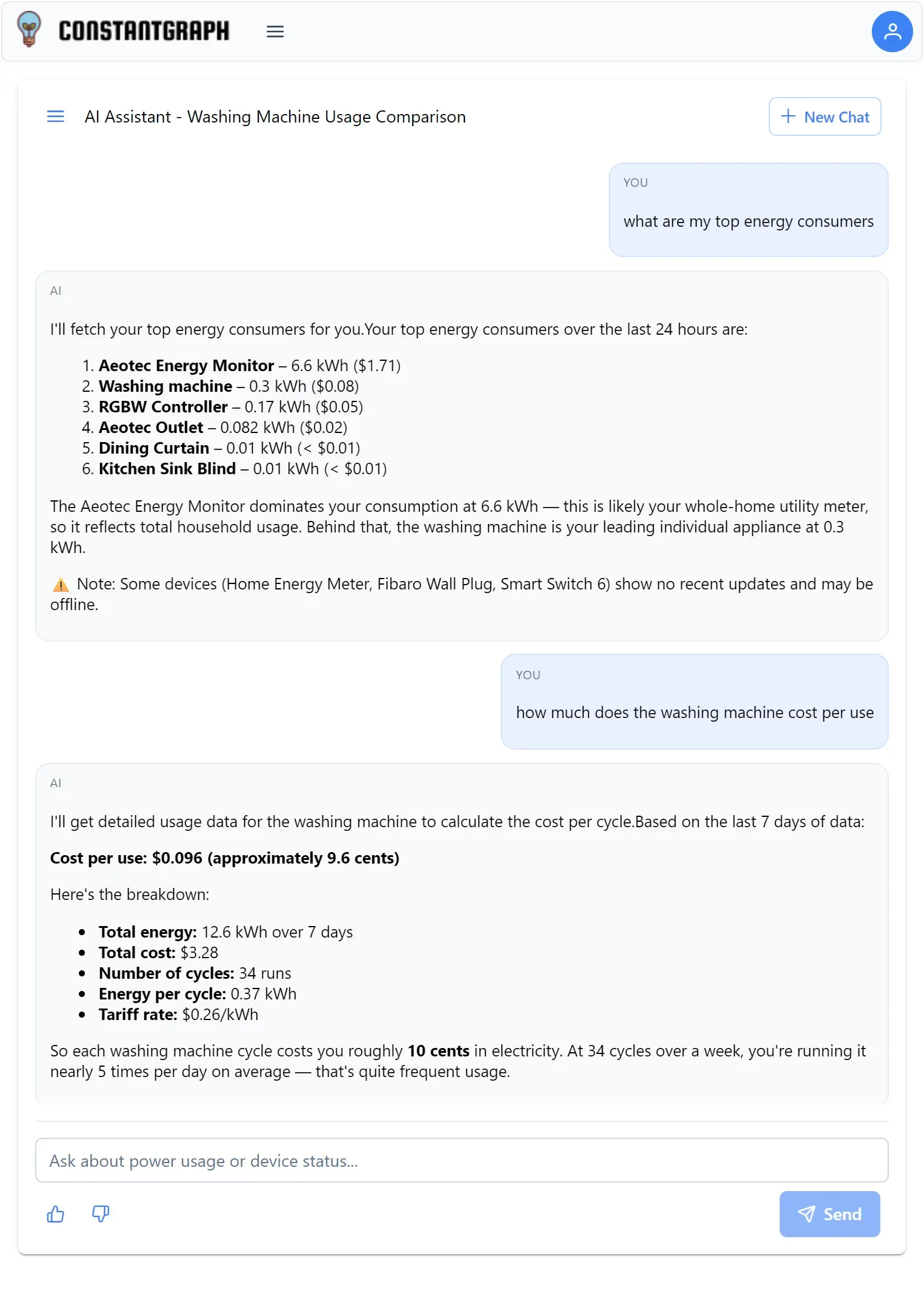
The Insight Copilot (Chat) Assistant lets you ask questions about your smart home in plain English and receive data-driven answers backed by your own device readings. Rather than navigating charts and configuration menus, you can simply ask what you want to know and the assistant fetches the relevant data, interprets it, and presents a clear summary.
The assistant is designed to go beyond reporting raw numbers. It compares your current usage to your own historical patterns, flags devices that may be offline, identifies unusual behaviour, and calculates per-appliance efficiency metrics. Every response is grounded in data retrieved directly from your account.
What the assistant can do
Current status: Ask what any device is currently reading, whether a switch is on or off, or what the temperature is in any room. The assistant retrieves a live snapshot from your account.
Energy and cost analysis: Ask how much energy a device used today, this week, or this month. The assistant reports both the consumption in kilowatt-hours and the estimated cost in your local currency where that information is available. It automatically compares your current usage to your own weekly average so you can see whether you are using more or less than usual.
Top consumers and rankings: Ask which devices used the most energy, which cost the most, or which have been running the longest. The assistant ranks your devices by any metric without you needing to check each one individually.
Home-wide sensor overviews: Ask for the current temperature, humidity, CO2 level, or battery status across every device in your home at once. The assistant groups results clearly and highlights any sensors with stale readings or errors.
Behavioural patterns: Ask whether a device normally behaves a certain way, when something usually happens, or whether a pattern is consistent. The assistant analyses the actual state-change history of your devices and describes what it finds — for example, typical opening and closing times for curtains or blinds, or the usual schedule for heating switching on.
Appliance efficiency: When a device has both usage and activation data available, the assistant automatically calculates per-cycle figures such as energy per wash cycle, cost per run, and average run time. These are often more useful than totals for understanding the true cost of running an appliance.
Anomaly detection: The assistant flags devices that have not reported recently, channels showing error states, and usage figures that look unusual compared to the historical pattern.
Difference from the SmartChart Assistant
The Insight Copilot and the SmartChart Assistant are complementary tools. The assistant is optimised for questions and analysis — it returns text answers with interpreted insight. The SmartChart Assistant is optimised for visualisation — it creates charts you can view, save, and interact with.
If you ask the assistant to create a chart or graph, it will answer with numbers in text and suggest you use the SmartChart Assistant for the full visual experience. If you ask the SmartChart Assistant a data question, it will focus on building the chart rather than analysing the figures.
Both tools are available from the main navigation. You can use them independently or together depending on whether you want to read a quick answer or explore data visually.
Asking your first question
Open the Insight Copilot from the main navigation menu. Type your question in the input field and press Enter or tap Send.
The assistant will briefly fetch data before responding. You will see a loading indicator while it works. Most responses arrive within a few seconds.
A good opening question is something concrete and specific to a device or metric you care about:
- "How much energy did my boiler use today?"
- "What is the current temperature in the living room?"
- "Which device cost the most to run this week?"
The assistant will retrieve the relevant data and give you a direct answer with interpretation.
How the assistant uses your data
The assistant only uses data from your own ConstantGraph account. It cannot access information about other users, general internet data, or manufacturer specifications for your appliances. Every figure it reports has been retrieved directly from your device readings.
When you start a new conversation, the assistant has no memory of previous conversations. Within a single conversation, it can refer back to data it already retrieved and build on earlier answers without going to fetch the same information again.
Comparing usage to your own patterns
If you ask about usage for a single day, the assistant will often compare that figure to your typical daily average over the past week. This context is often more useful than the raw number — knowing that your heating used 4.2 kWh today is more meaningful when you also know your typical daily usage is 3.1 kWh.
To request this comparison explicitly, ask something like "How does today's washing machine usage compare to normal?" and the assistant will fetch both the current day and the weekly average in the same response.
Asking about device behaviour and patterns
The assistant can analyse state-change history to describe how a device typically behaves. This is particularly useful for automated devices such as curtains, blinds, heating schedules, or any switch controlled by a routine.
Ask questions like:
- "Does the dining room curtain normally open at the same time each morning?"
- "When does my heating usually come on?"
- "Is the front door sensor triggering more often than usual?"
The assistant fetches the raw history of state changes, analyses the timestamps across the available period, and describes the pattern it finds — including consistency, typical times, and any outliers. If the history is too short to establish a reliable pattern it will say so and suggest fetching a longer window.
Per-cycle appliance analysis
For appliances such as washing machines, dishwashers, and tumble dryers, the assistant can calculate efficiency metrics per cycle rather than just totals. When both usage data and activation count data are available, it will report:
- Energy used per cycle (kilowatt-hours per wash or run)
- Cost per cycle in your local currency
- Average run time per cycle in minutes
These figures are often more useful for understanding the real cost of running an appliance than weekly totals, particularly when comparing different usage patterns.
Conversations and history
Each conversation is automatically named based on the data retrieved in the first response — for example "Boiler Energy Last 7 Days" or "Top Energy Consumers March." Previous conversations are listed in the sidebar and can be reopened to review earlier answers.