
Data Types define how data is handled when coming into ConstantGraph, which icons are used to represent it and which axes and units are used to display data. The following types are defined:
 None / Other - used when no other data types are suitable
 Unlocked/Locked - displays an unlocked or locked padlock
 Illuminance - uses Lux as the display units
 Energy (kWh) - Used for calculating the price of energy. Can be converted automatically to Watts by using the Difference aggregation
 Power (Watts) - Used for power dashboards. Can be converted automatically to KWh by using the Sum aggregation
 HVAC - Displays different icons depending on heating or cooling status
 Battery Charge - Displays different battery icons between 0 and 100% charge
 Relative Humidity - Usage percentage on graph axis
 Sensor Tripped - Shows different icons for tripped and untripped sensors
 Dimming Level - Shows different icons between 0 and 100% dimming level
 On/Off - Shows different icons for on and off for a switch or pushed and up for a button
 Temperature - Units can be customised to show °C or °F
 High Setpoint - Heating high set point
 Low Setpoint - Cooling low set point
 Sensor Armed - Shows different icons for sensor armed or disarmed
 Sensor Level - Generic sensor with no pre-set units
 Siren - Shows different icons for siren on or off
 Window Covering - Shows different icons between 0 and 100% open
 TVOC - Total Volatile Organic Compounds: uses ppm as the units
 Voltage - Uses volts as the units
- Contact sensor - Closed or open
 Presence sensor - Not present or present
Further to this custom data types can be defined. The purpose of a custom data type is to provide some pre-processing to incoming data so it can be converted into the correct units. For example degrees Celsius could be converted into degrees Fahrenheit by applying a transformation with a Multiplier of 1.8 and an Offset of 32. The transformation will be applied via data coming into the timedata API call or via the SmartThings integration.
Custom data types can also be used to import data from SmartThings devices that wouldn't otherwise be imported by specifying the SmartThings capability and attribute. Note that it may take a while for data of the new data type to start importing, this can be speeded up by having the device change in value. Where channels have non-numeric data (e.g. on or off) these will be converted automatically into numerical values. The conversion values will be shown in the custom data type once they have been encountered; it is not possible to edit these values. Up to 10 custom data types may be created.
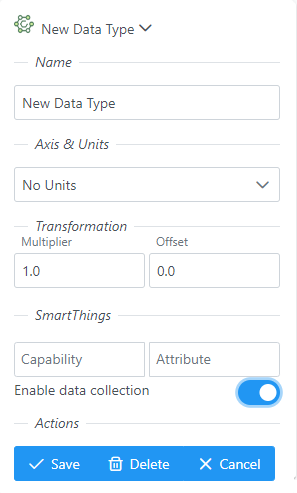
All data types can be enabled or disabled for import of data from SmartThings; this does not impact the import of data via the ConstantGraph API. Channels of the matching data type will stop importing data, if the Enable Data Collection switch is disabled. This will not delete the channel or pre-existing data in that channel.